
Poisoned Pipeline Execution (PPE) in CI/CD: When Your Build System Turns Against You
Executive Summary
Poisoned Pipeline Execution (PPE) is a CI/CD attack where an adversary manipulates code, configuration, or inputs so that malicious commands execute inside a pipeline. The attacker does not need direct access to the CI system. They only need a way to influence what the pipeline runs.
Because CI pipelines often hold deployment keys, cloud credentials, and signing secrets, PPE can escalate quickly from “just a build” to full infrastructure compromise.
What Is Poisoned Pipeline Execution?
Poisoned Pipeline Execution is classified as CICD-SEC-04 in the OWASP Top 10 CI/CD Security Risks. It describes situations where attackers exploit trust relationships between source control and CI systems to inject malicious instructions into automated workflows.
At its core, PPE exploits a simple reality:
Pipelines execute code.
If an attacker controls what gets executed, they control the pipeline.
CI systems are designed to automatically build and test whatever is committed. That automation is power. Power plus misplaced trust equals attack surface.
Why CI Pipelines Are High-Value Targets
CI environments frequently have:
-
Access to environment variables containing secrets
-
Deployment credentials for staging or production
-
Signing keys for release artifacts
-
Permission to publish packages
-
Network access to internal systems
A CI runner often operates with non-interactive, privileged automation tokens. If an attacker achieves code execution inside the pipeline, they inherit that power.
CI is not just do build automation. It also is a privileged control system.
The Core Trust Boundary Problem
In many workflows, especially collaborative or open environments, attackers can influence repository contents — through pull requests, forks, dependency changes, or misconfigured permissions.
The Three Forms of PPE
Security research commonly divides PPE into three conceptual categories.
1. Direct PPE

Direct PPE occurs when the attacker modifies the pipeline configuration itself.
Examples of targets:
-
.github/workflows/*.yml -
gitlab-ci.yml -
Jenkinsfile -
Build configuration scripts
If the pipeline runs automatically on changes to these files without protection or review, malicious commands will execute immediately.
2. Indirect PPE
 Even if the CI configuration file is protected, pipelines usually call:
-
Shell scripts -
Makefiles -
Test harnesses -
Package build scripts -
Custom build tools
If an attacker can modify one of those files, and the pipeline executes it, that is still poisoned execution.
The CI config is clean. The code it runs is not.
Indirect PPE is dangerous because teams often protect pipeline YAML but forget that the YAML references executable content.
3. Public PPE (Third-Party Triggered PPE)
This applies particularly to open-source and collaborative projects.
If pipelines automatically run on external pull requests or forks, attackers can submit changes designed purely to execute malicious commands in CI.
Some CI triggers execute in elevated contexts even when the code comes from untrusted branches. If secrets are injected before trust is validated, exposure becomes trivial.
Automation without gating equals privilege without verification.
Common Misconfigurations That Enable PPE
Several recurring patterns create PPE exposure:
- Running CI on unreviewed changes
- Allowing pipeline configuration files to be modified without protection
- Injecting secrets into jobs triggered by external contributors
- Executing repository scripts without sandboxing
- Reusing shared caches or artifacts across trust boundaries
- Granting overly broad automation tokens
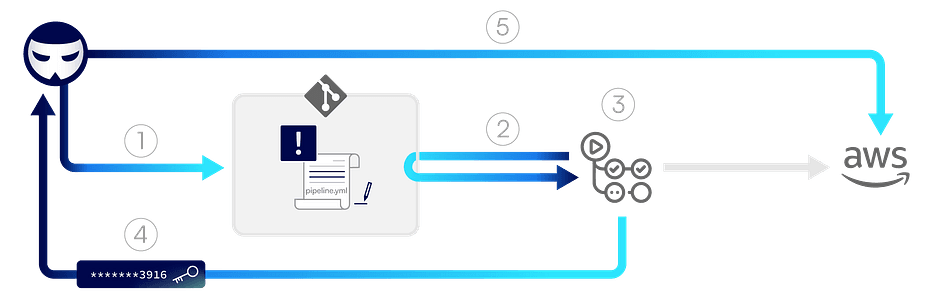
Attack Flow: A Typical PPE Scenario
A simplified sequence looks like this:
-
An attacker gains the ability to submit or modify repository content.
-
They insert malicious commands into pipeline configuration or executed scripts.
-
The CI system automatically runs the pipeline.
-
The malicious code executes in the CI environment.
-
Secrets are exfiltrated or artifacts are modified.
Impact of Successful PPE
The consequences can include:
- Secret exfiltration (API tokens, cloud keys, signing certificates)
- Deployment of backdoored artifacts
- Supply chain compromise of published packages
- Lateral movement into internal infrastructure
- Persistent compromise through poisoned build outputs
In mature DevOps environments, CI is deeply integrated into release pipelines. Compromising CI often means compromising production.
Recent CI/CD Poisoned Pipeline Execution Vulnerabilities
1. GHSL-2024-226 & GHSL-2024-227 — PPE & Cache Poisoning in Cilium
Overview:
In the push-chart-ci.yaml workflow used by the Cilium project, a pipeline triggered after successful image builds checked out untrusted code from a pull request head into a job workspace and then executed a script from the repository. This created a PPE condition where attacker-controlled script content could run within the pipeline.
on:
  workflow_run:
    workflows:
      - Image CI Build
      - Hot Fix Image Release Build
    types: [completed]

jobs:
  push-charts:
    runs-on: ubuntu-22.04
    steps:
      - name: Get triggering event ref
        # Loads triggering PR head ref into a variable
      - name: Checkout Source Code
        uses: actions/checkout@v4
        with:
          ref: ${{ steps.get-ref.outputs.ref }}
      - name: Get version
        run: |
          ./contrib/scripts/print-chart-version.sh
Why it matters:
The print-chart-version.sh script was executed after checking out untrusted content, which meant any code in that script (e.g., an echo $(whoami) or malicious payload) ran in the pipeline.
Secondary Issue — Cache Poisoning
This same uncontrolled execution allowed an attacker to modify the default branch CI cache, influencing future workflows that used the cache. Cache poisoning along trust boundaries means files restored for other jobs can contain attacker-controlled content — effectively spreading compromise.
Resources:
Cilium PPE & Cache Poisoning advisory (GHSL-2024-226 / GHSL-2024-227) — GitHub Security Lab
2. GHSL-2024-268 — Hibernate ORM PPE via pull_request_target
Overview:
The Hibernate ORM project’s contributor-build.yml triggered on pull_request_target — a GitHub Actions event that executes workflows with access to secrets for pull requests — but it then checked out the PR head commit instead of the protected base branch. That mixed a privileged context with untrusted code.
on:
  push:
    branches: [main]
  pull_request_target:
    branches: [main]

steps:
  - name: Check out PR head
    uses: actions/checkout@v4
    with:
      ref: "refs/pull/${{ github.event.pull_request.number }}/head"
  - name: Run build script
    env:
      DEVELOCITY_ACCESS_KEY: "${{ secrets.GRADLE_ENTERPRISE_ACCESS_KEY }}"
    run: |
      .github/ci-prerequisites.sh
      ci/database-start.sh
Why this was dangerous:
Even though the workflow attempted to guard where secrets were passed, checking out the PR head commit placed untrusted scripts into the runner. Those could execute arbitrary code before or while privileged environment variables were loaded, meaning secrets like GRADLE_ENTERPRISE_ACCESS_KEY were exposed in runner memory and thus leakable.
Resources:
GHSL-2024-268 advisory on Hibernate ORM PPE — GitHub Security Lab
3. GHSL-2024-208 — Apache Superset PPE via Issue Comment Trigger
Overview:
In Apache Superset, a workflow triggered by a pull request comment (issue_comment) executed insecure logic that parsed the comment and then checked out the PR head commit — bringing untrusted script files into the pipeline.
on:
  issue_comment:

jobs:
  ephemeral-docker-build:
    runs-on: ubuntu-22.04
    steps:
      - name: Get PR info
        uses: actions/github-script@v7
      - name: Checkout ${{ github.ref }}
        uses: actions/checkout@v4
        with:
          ref: ${{ steps.get-sha.outputs.sha }}
      - name: Build ephemeral env image
        run: |
          ./scripts/build_docker.py ci pull_request --build_context_ref ...
Why this turned into a PPE vector:
-
The workflow didn’t gate who could trigger it on comments.
-
It checked out the PR head commit SHA, which is untrusted code.
-
It then executed a script (build_docker.py) from that untrusted source.
This combination allowed malicious actors to craft PRs and comments to execute arbitrary code with access to secrets like AWS credentials in the CI environment.
Resources:
GHSL-2024-208 advisory on Superset PPE — GitHub Security Lab
REFERNCES
-
https://securitylab.github.com/advisories/GHSL-2024-208_Apache_Superset/
-
https://securitylab.github.com/advisories/GHSL-2024-226_GHSL-2024-227_Cilium/
-
https://securitylab.github.com/advisories/GHSL-2024-268_Hibernate_ORM/
-
https://owasp.org/www-project-top-10-ci-cd-security-risks/CICD-SEC-04-Poisoned-Pipeline-Execution
-
https://medium.com/cider-sec/ppe-poisoned-pipeline-execution-34f4e8d0d4e9